I was assigned to assist the GIS Department in accessing a production SQL Server database.
This production database will provide real-time mapping for field engineers.
However, there were concerns regarding its performance on business applications. I proposed several solutions that Microsoft SQL Server 2016 offers, such as Database Replication and AlwaysOn technologies. Unfortunately, these options were not viable. As a workaround, the GIS Department requested the creation of databases on a separate VM and asked for the databases to be refreshed once a day. As a DBA, I recognize that this is not a best practice, but I am committed to supporting the GIS team and the field engineers.
To accomplish these tasks, I developed two SSIS packages that utilize the File System Task and created a SQL Agent job containing eight steps:
Target Server: MS SQL Server 2016
SQL Agent job : _DailyRestore_GIS_DBs
Steps:
- Step 1 – Moving File from Source to Destination folder
- Step 2 – GIS Production DB access
- Step 3 – Restoring GIS Production Database
- Step 4 – Granting users access GIS Production DB
- Step 5 – GIS Development DB access
- Step 6 – Restoring GIS Development Database
- Step 7 – Granting users access GIS Development DB
- Step 8 – Deleting the old backup file from Source Folder.
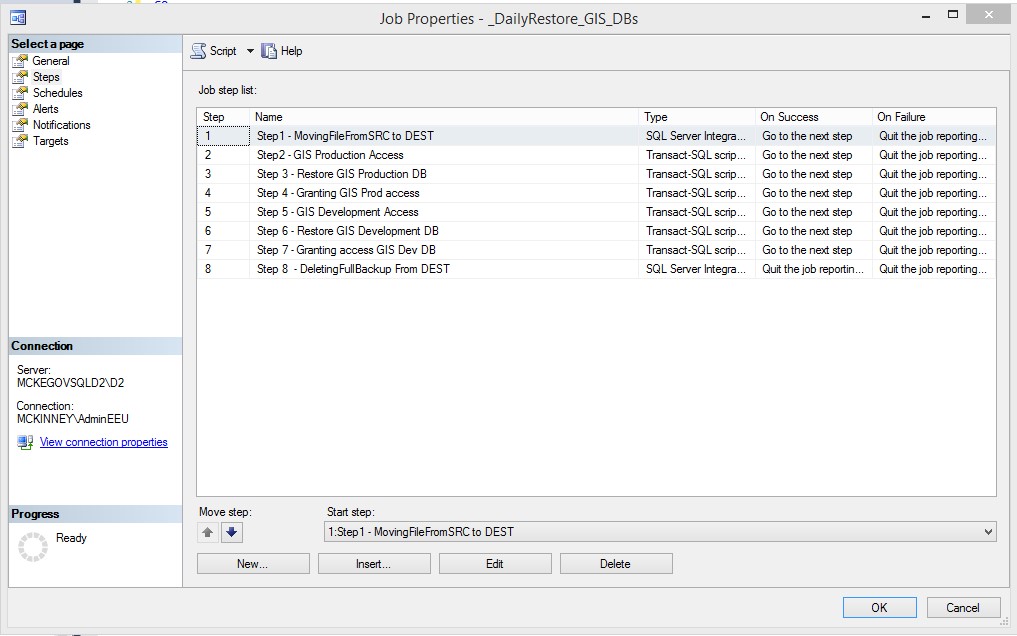
Then, I tested the SQL Agent job and it ran successfully.

 SQL INDONESIA
Leave a comment