Over the years, I learned that Microsoft SQL Server product has TCP/IP port configured to 1433 by default. I strongly advised to change the SQL Server TCP/IP port to unique port number. In addtion, It’s Microsoft Best Practice advised SQL Server database’s TCP/IP port to be changed. Enclosed are the procedures how to change Microsoft SQL Server 2008 R2 database port.
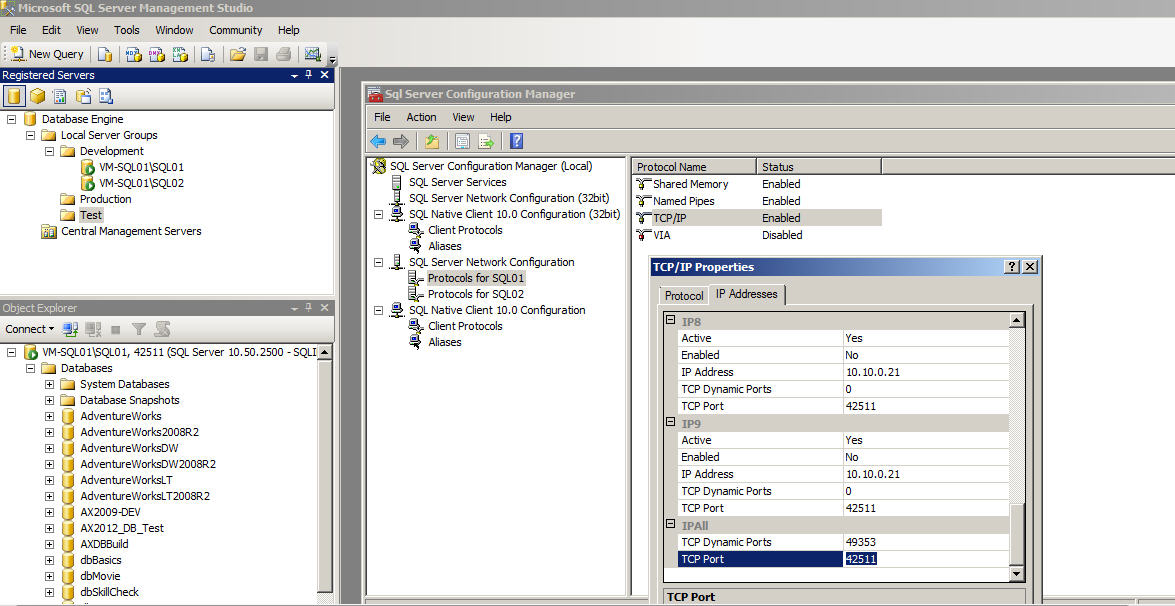
- Go to SQL Server Configuration Manager –> Select Protocols for SQL01
- Right Click the TCP/IP –> Then go to Properties
- Click on IP Addresses –> Scroll down to TCP Port
- Then changed the TCP Port to unique number.
 SQL INDONESIA
Leave a comment